Runs in your tenant · nothing leaves your environment

Find the money Azure is quietly wasting.

TenantThrift deploys into your own subscription, finds idle and orphaned resources across your tenant, and emails you a prioritized PDF report. The first report is free — see real savings before you pay anything.

Deploys to your own Azure environment · no sign-up · no secrets to share.

First report is free Runs entirely in your tenant No secrets to share Your data never leaves your environment

Built for security-conscious teams

Your environment. Your data. No exceptions.

TenantThrift is for teams who can't hand tenant access to an outside SaaS. There's nothing to sign up for and nothing to trust us with — the whole thing lives in your own Azure environment.

Lives in your environment

Scanning, reports and remediation all run inside your own subscription. Your resource data never leaves your tenant.

No secrets to share

A managed identity does the work, so there are no client secrets, passwords or keys to hand over — not to us, not to anyone.

The first report is free

Deploy, run one scan, read the PDF. No licence key and no sign-up needed to see what your tenant is wasting.

Two ways to run it

Start free. Upgrade when you want more.

Begin with a free PDF report. When you're ready for dashboards, automatic fixes and team features, add the admin portal.

Headless

The free report

Deploy it, get a report, see if you like it.

  • Deploys into your own subscription
  • Emails you a prioritized PDF report
  • First report free — no sign-up, no key
  • Runs about €1–3/month of Azure resources
Get my free report
Premium

Admin portal

The full platform

A live dashboard and one-click fixes — all inside your tenant.

  • Live savings dashboard & trends
  • One-click remediation, with safety nets
  • Reports to multiple recipients
  • Scheduled scans & role-based access
See premium plans

A few guided setup steps (a sign-in app for your team) — we walk you through it.

Premium · admin portal

See savings add up — and act on them.

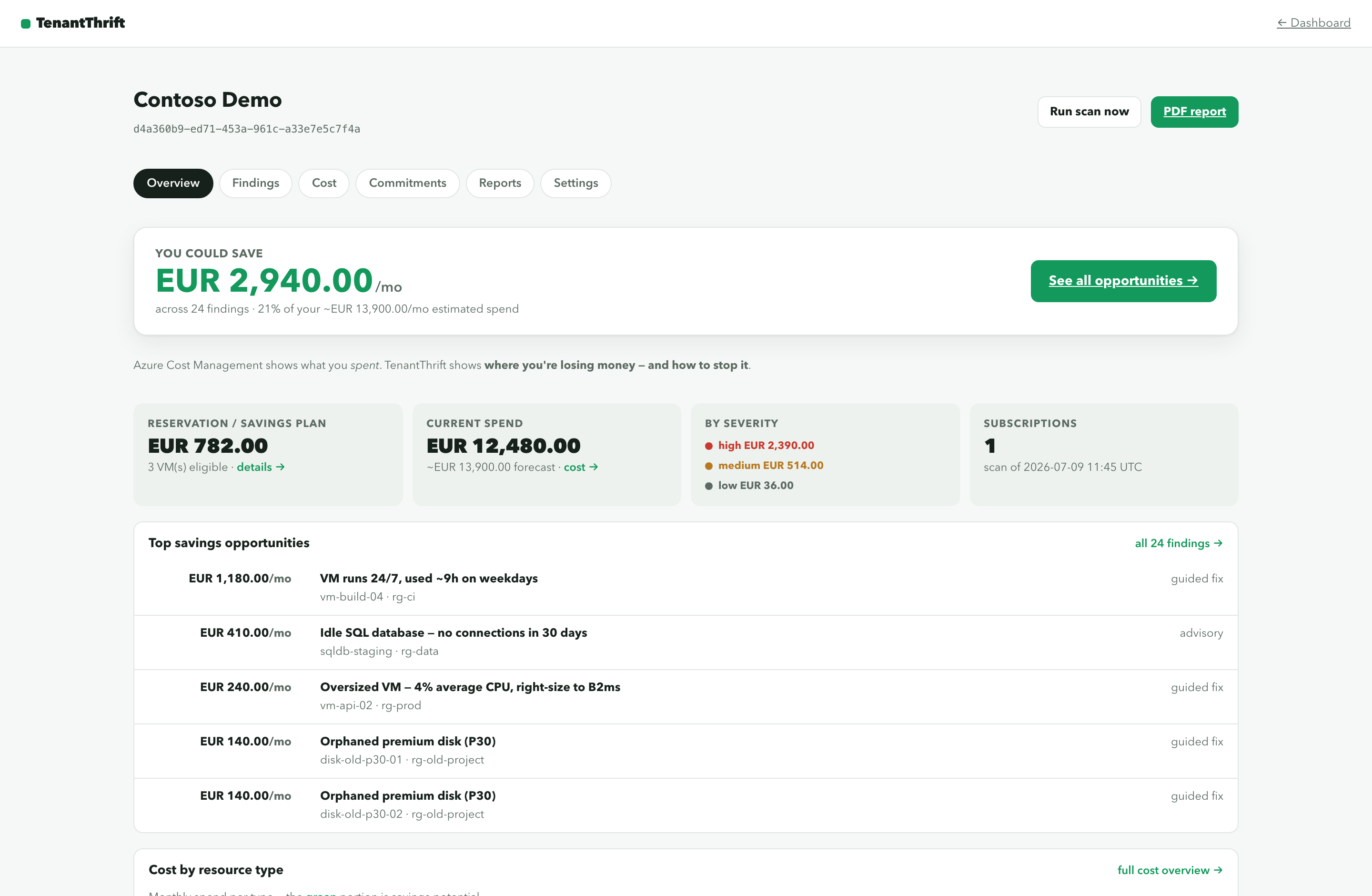
The portal turns each scan into a living dashboard: what you can save, what's already been saved, and the exact resources behind every number.

thrift-portal · your tenant / dashboard

Potential monthly savings

€ 2,940/mo

across 38 findings · 3 subscriptions

€ 1,120Realized
38Findings
91-click fixes
Idle VPN gateway · westeurope Cost Management · high € 312
Over-redundant storage (GRS) Retail price · medium € 148
Unused public IP · Standard Retail price · medium € 4

What premium adds

From "here's the waste" to "it's handled."

One-click remediation

Fix findings straight from the portal — deallocate, delete or right-size. Every destructive action snapshots first and can be dry-run. Licensed plans only.

Reports to the whole team

Send each report to multiple recipients, with an optional alert email when savings cross a threshold you set.

Scheduled scans

Run daily or weekly on a schedule you set in the portal — changing it never needs a redeploy.

Savings over time

Track potential vs. realized savings on a trend chart, so the value is obvious to anyone you report to.

Role-based access

Give your team Admin, Remediator or Reader access through your own Entra ID — no extra user directory.

Many subscriptions

Scan one subscription or your whole estate, and see the savings rolled up in a single place.

What it finds

The waste that hides in every Azure bill.

Industry estimates put idle waste at 10–15% of a typical Azure bill. TenantThrift finds it, prices it from your real costs, and ranks it by how much you'd save.

Compute

VMs left running when they shouldn't be, and machines far bigger than the work they actually do.

Storage & disks

Orphaned disks, stale snapshots and storage paying for redundancy it doesn't need.

Networking

Forgotten public IPs, idle load balancers and gateways quietly billing by the hour.

Databases

Over-provisioned and idle databases that belong on a cheaper or serverless tier.

App & PaaS

Empty App Service Plans and log workspaces hoarding expensive retention.

Commitment savings

Reservation and savings-plan opportunities you're leaving on the table.

How it works

Three steps. The first report is free.

01

Deploy

Drop TenantThrift into your own subscription. It runs read-only by default — nothing of yours leaves your tenant.

02

Scan

It inspects your subscriptions, prices each finding from your real costs, and ranks them by waste.

03

Act

A PDF report lands in your inbox. Add the portal for a live dashboard and one-click fixes.

Get started

Get your free report.

Deploy TenantThrift into your own subscription, pick a region, and run your first scan. The first report is free — everything is created inside your own environment.

Deploy to Azure

Prefer the CLI? az deployment sub create --location westeurope --template-file infra/main.bicep --parameters reportToEmail=you@example.com The premium admin portal adds a short guided setup — full steps are in the project README.

Pricing

You host it. The plan is just the licence.

You run TenantThrift in your own tenant, so you pay only for a licence. The first report on any fresh deployment is free.

Personal

€15/mo

  • 1 Azure subscription
  • Scheduled scans
  • PDF reports by email
Subscribe
Most popular

Business

€35/mo

  • Up to 5 subscriptions
  • Admin portal & one-click remediation
  • Multiple recipients & alerts
Subscribe

MSP

€79/mo

  • Unlimited subscriptions
  • Admin portal & remediation
  • Priority support
Subscribe

FAQ

The questions teams ask first.

Do you ever see our Azure data?

No. Everything runs inside your tenant. The only thing that reaches our servers is a deployment ID and, on paid plans, a licence key — never resource data, costs or credentials.

What's the difference between the free report and premium?

The free, headless mode deploys into your tenant and emails you a PDF report — the first one is free. Premium adds the admin portal: a live dashboard, one-click remediation, multiple report recipients, scheduled scans and role-based access.

Do we have to share any secrets or credentials?

Never. TenantThrift uses a managed identity, so there are no client secrets, passwords or keys to hand over, store or rotate.

What permissions does it need?

Reader and Cost Management Reader at subscription scope. One-click remediation is opt-in and adds Contributor — only if you choose to enable it.

What does it cost to run in our subscription?

The price on this page is the TenantThrift licence. On top of that you pay Azure directly for the small set of resources it deploys — roughly €1–3/month for the free headless report, or about €13–18/month with the admin portal added. It's dwarfed by what the first report finds.

See what your tenant is wasting.

Deploy it, run one free report, read the PDF.

Get my free report